ReplacementRadios, one of the largest factory audio/video websites, has branched out!! If you?ve been to our site, you know we have a HUGE selection of OEM radios and compatible accessories. Now we?re offering a few select products here too. Same great ReplacementRadios quality.....in a new location.
SUMMARY
NEW Factory (OEM) GM CD6 drive
New Old Stock assembly line leftover
Manufactured by Panasonic for Delco
Installation instructions are NOT included
But basic ones appear below
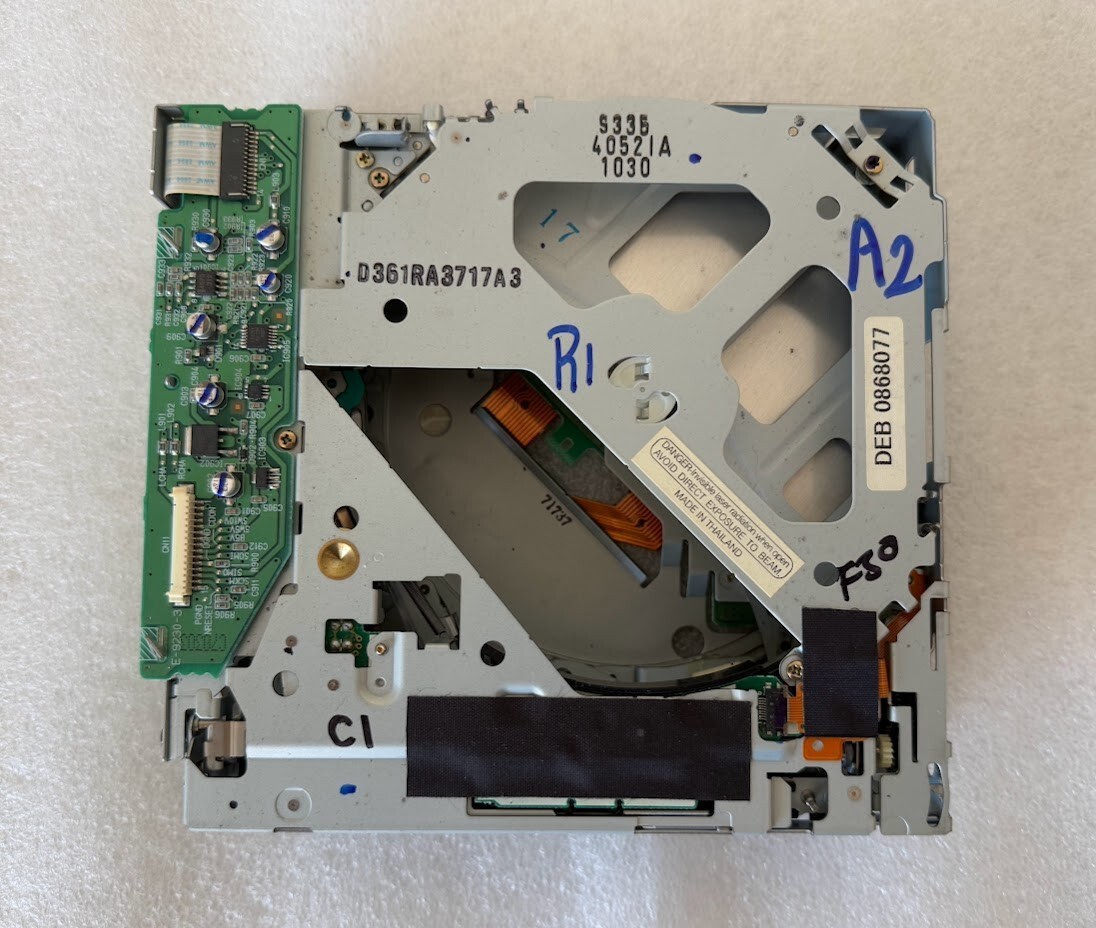
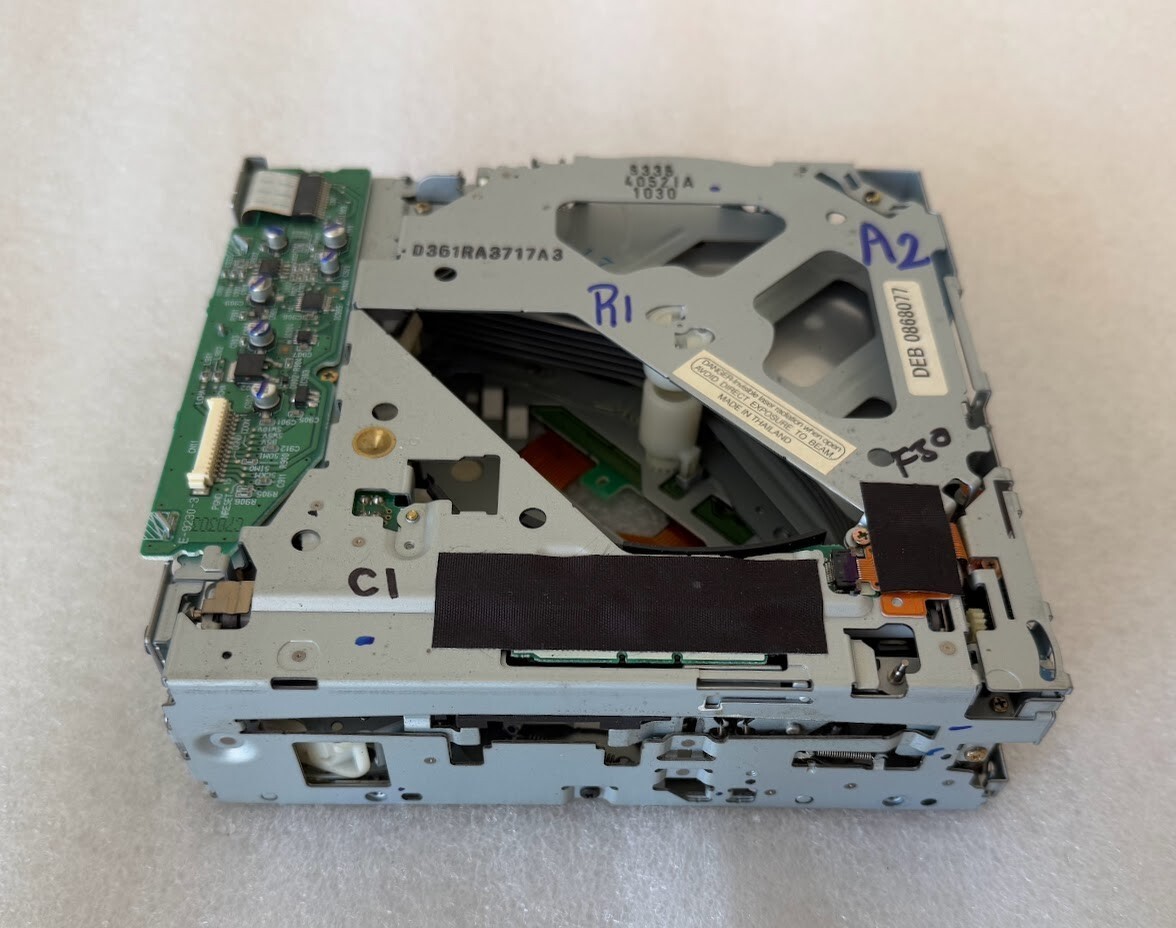
Has double 'kidney' openings above CD trays
Not compatible with most single 'triangle' versions
Except the E-9058-2
A GREAT way to replace a drive with problems like:
CD playback issues or errors
CD load issues or errors
CD eject issues or errors
Compatible with the AM/FM/CD6 radio
Not the remote 6 CD changer
Remote means separate from the radio
Compatible with BOSE or non-BOSE CD6 radios
Not compatible with navigation radios
Not compatible with single CD or CD/Cass radios
Not compatible with MP3 radios
Plays standard audio format CDs and CDRs
Will NOT trigger the THEFTLOCK system
Plug your radio back in and go.
Has NEVER been in a vehicle!!
Will require removal of radio from vehicle
Do not attempt with radio connected
Plug and play
No soldering or splicing required
Just a few screws and one or two cables
See Removal/Installation Instructions section below
It also has trouble-shooting info
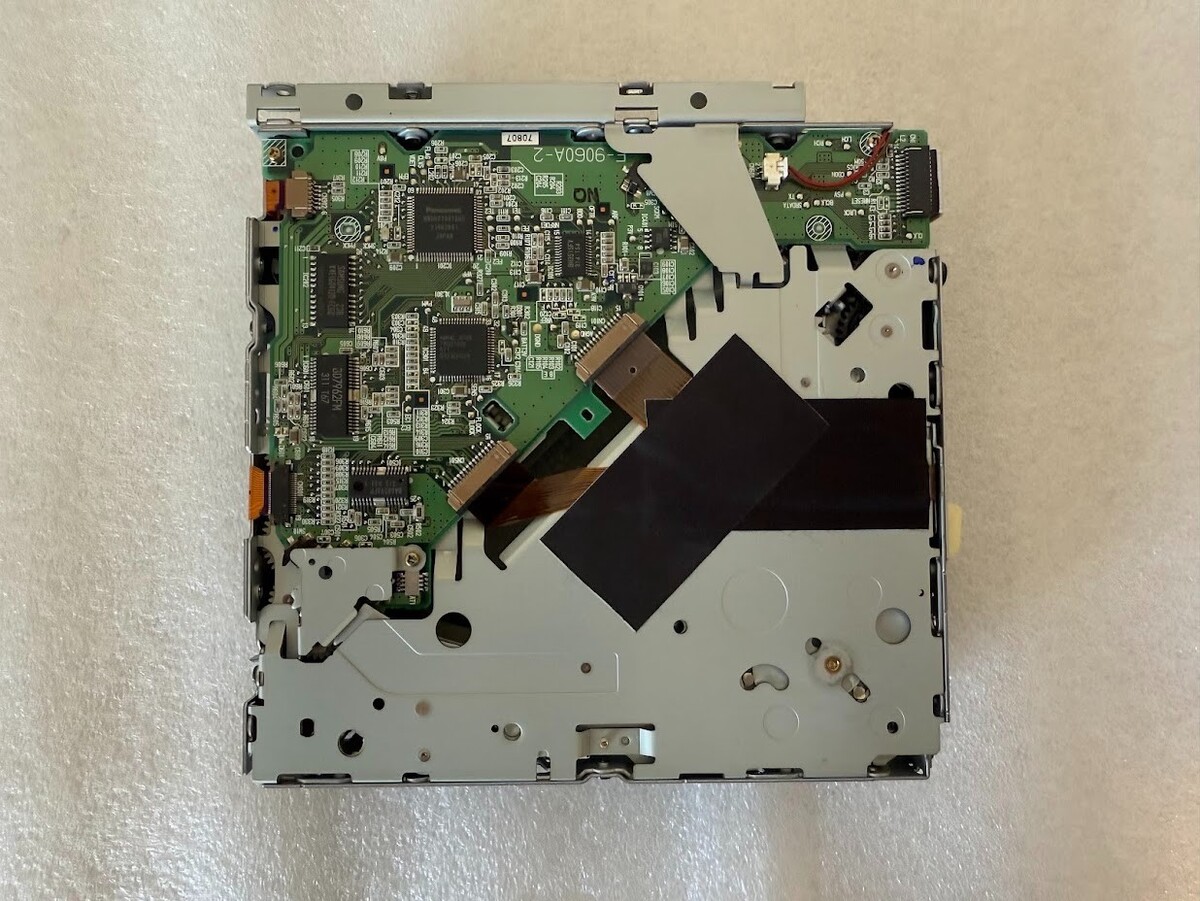
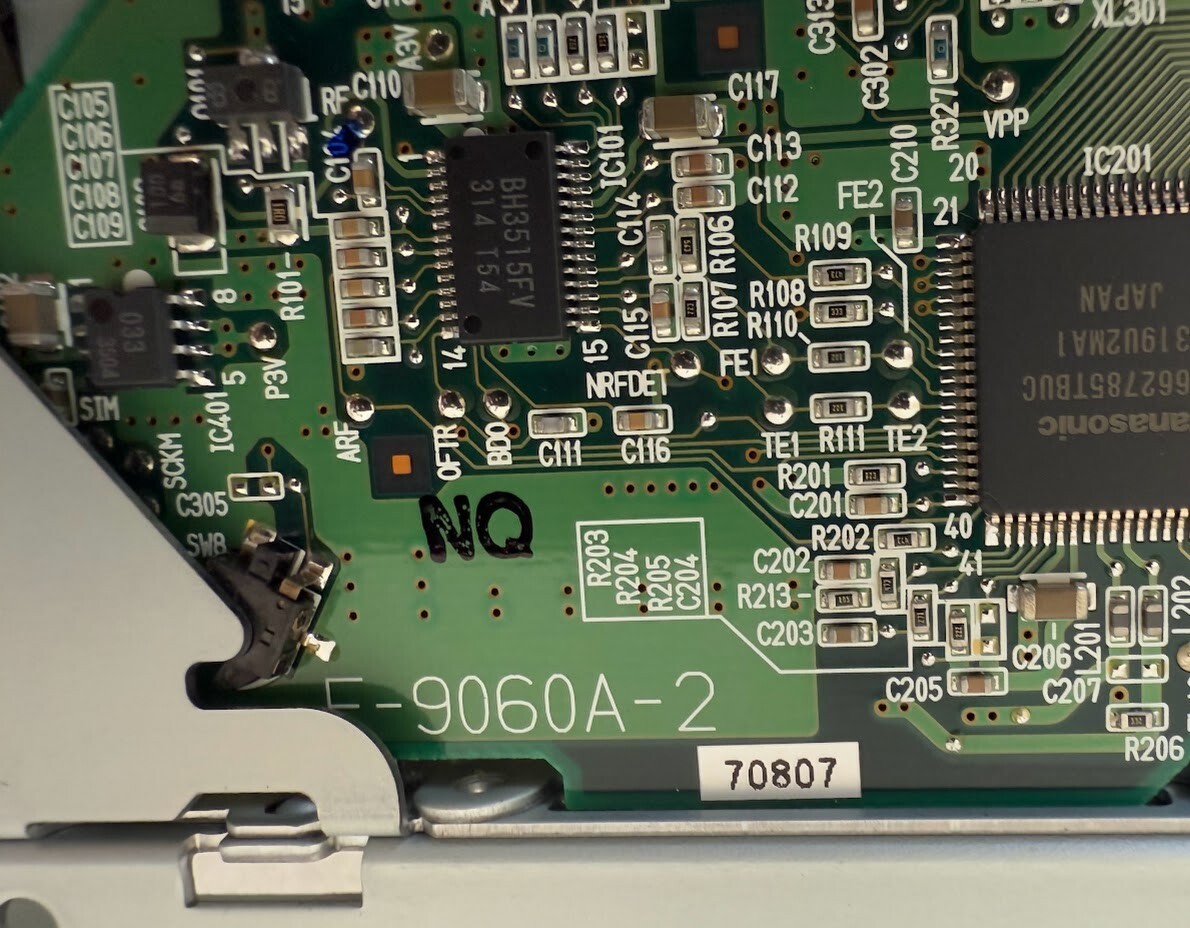
Bottom PCB board number is typically E-9060A-2
Works in place of E-9058-2 as well
Match your number to one of these!!
Top PCB board number is typically E-9230
Ending in -1, -2, -3, etc
NOT compatible with PCB E-9060A-1
Has a 14-pin ribbon connector on bottom PCB board
Included rear bracket may need removed
Some cases had a larger opening than others
6 month warranty
DETAILS
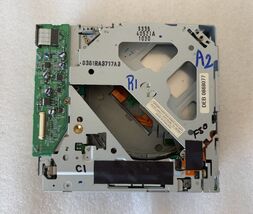
This is a new 6 disc CD drive for select Delco radios found in Chevrolet, GMC and Cadillac midsize or fullsize trucks, SUVs and vans from late 2002 and into 2003. (Plus a few cars, as long as you have one of the PCB numbers listed here. E-9058-2 or E-9060A-2.) Even though it looks like the drive used in other applications (Ford, Nissan, Toyota, Audi, Hyundai, Honda, etc), this is the GM version and it's not usually interchangeable. It may look like the drive used in Cadillac cars but we have not confirmed fitment in anything not listed, so you are buying at your own risk if you do not have a vehicle that's listed. There is a 6 month replacement warranty on this item. It covers functional defects only.
Instructions for matching to your drive:
You will need to pop the top case off your radio to verify yours has this drive because some radios were offered with a different, incompatible drive. Especially in the 2003 model year. If yours doesn't look virtually identical to the one pictured, it won't work for you. The most important things to look for is the PCB number on the bottom green board. It must be E-9060A-2 or E-9058-2. If yours has a single triangle opening above the CD trays, this is often not the right one. (Unless it is E-9058-2.) You might need our E-9060A-1 drive instead (item 272193403351). If you do not need the rear bracket that is attached to this one, you will need to remove it by extracting the two 3/16 hex screws. (Some cases had a larger opening than others.)
Sometimes the package gets jolted hard, in just the wrong manner, and something gets bounced out of place in the drive. (You will notice there are a lot of spring-loaded parts in it.) If you have difficulties after install, please email us before jumping to conclusions that we sent the wrong thing, a used drive, etc. You can see from our feedback, that's not how we operate. Also see the Removal/Installation Instructions section below, for some special install considerations.
APPLICATIONS
Possible applications have been entered here. Please see the notes for each application. The most important things to look for is the PCB number on the bottom green board. It must be E-9060A-2 or E-9058-2. If yours has a single triangle opening above the CD trays, this is often not the right one. (Unless it is E-9058-2.) You might need our E-9060A-1 drive instead. (Item 272193403351). A few vehicles on the list were offered with different drives. Especially 2003 models ** Make sure to follow the instructions in the Instructions for matching to your drive section above and confirm this is the drive you have BEFORE ordering.
In very rare instances, you may find replacing the drive does not solve your problem. Replacement of your radio might be your only option. Please be aware we have no control over this. Nor do we have any way of predicting when this is going to happen.
Here is a list of possible applications:
Buick: 2002-2003, if you match the PCB# to yours
Chevrolet: 2002-2003, if you match the PCB# to yours
GMC: 2002-2003, if you match the PCB# to yours
Oldsmobile: 2002-2003, if you match the PCB# to yours
Pontiac: 2002-2003, if you match the PCB# to yours
Other applications may be possible. Email before purchase
Removal/Installation Instructions Instructions are not included but installation is relatively easy and basic guidelines appear here. However, if you're not mechanically inclined, you shouldn't be buying it.
You start by disconnecting the radio from the vehicle harness and letting it sit for at least 30 minutes. Then remove the 3/16 hex screw from the back of the top cover, if present. You will then remove the face by prying the tabs up slightly and pulling the face towards you. (It may fight you a bit...) After that you will remove the two 3/16 screws holding the drive in front and the two holding it in the rear. Then unplug the wired connector from the top board. You can now remove the drive and check the PCB number on the bottom green board. (Some drives have a black plastic cover over the bottom board that will have to be removed first.) Assuming your board has a PCB number from this ad, this will work for you. If you do not need the rear bracket that is attached to this one, you will need to remove it by taking the two 3/16 hex screws out of it. (Some cases had a larger opening than others.)
Make sure you put the screws back in the same holes as before and do not over-tighten them. They are sized differently, even if it isn't obvious by looking. Sometimes customers have problems with the drive continually cycling after install and saying INITIALIZING on the display or sometimes it loads but will not play. This is usually a result of the wrong screw being placed in the hole directly behind the volume/power knob. If you have this problem and you think you've put the screws in the right hole, remove that screw altogether and see if it works then. If it does, the screw is either in the wrong hole or has been over-tightened. You can file the end of the screw down to make it shorter and re-insert it. (Or you can just leave it out. We do not recommend leaving it out but several customers have done so and have not reported any repercussions.)
Do not attempt this repair with the radio still plugged in! Unplug it and let it sit for at least 30 minutes.
ABOUT US:
We are NOT a salvage yard. We are NOT affiliated with a salvage yard. We don't have the typical auto parts mentality. We specialize in one thing: factory audio/video. We are very picky and strive to provide items we would be proud to have in our own vehicles. When you buy an item from us, it is guaranteed to work. Occasionally problems arise with electronics. However, please be assured we never knowingly send out a defective item. It is not in our best interest to send out defective items because we waste time and money replacing them under our warranty. We aim to keep our returns low and our customer satisfaction high. Please give us a chance to add you to our long list of satisfied customers.
SHIPPING HANDLING
Shipping cost is based on weight and zip code. This site does the figuring, not us. If you feel their calculation is high, you might be underestimating the package weight and/or current shipping costs from our zip code (62401) to yours. Please don't ding us for shipping in the ratings, as we have no control over ever-increasing carrier rates.
We will enter a tracking number into your order details here on the site. They will email it to you if your notification preferences are set correctly.
A signature is not typically required. If you are not home to receive the package, it will most likely be left at your door. Please monitor it's progress and arrange to collect it when it arrives.
This site provides a section/tab in each ad for Shipping information. We encourage you to check that section for prices, methods, time-frames, etc.










 GM CD6 drive mechanism 2002+ Delco Delphi radio OEM factory original mech 6CD CD added to cart.
3 available in stock
GM CD6 drive mechanism 2002+ Delco Delphi radio OEM factory original mech 6CD CD added to cart.
3 available in stock
 Please wait while we finish adding this item to your cart.


