


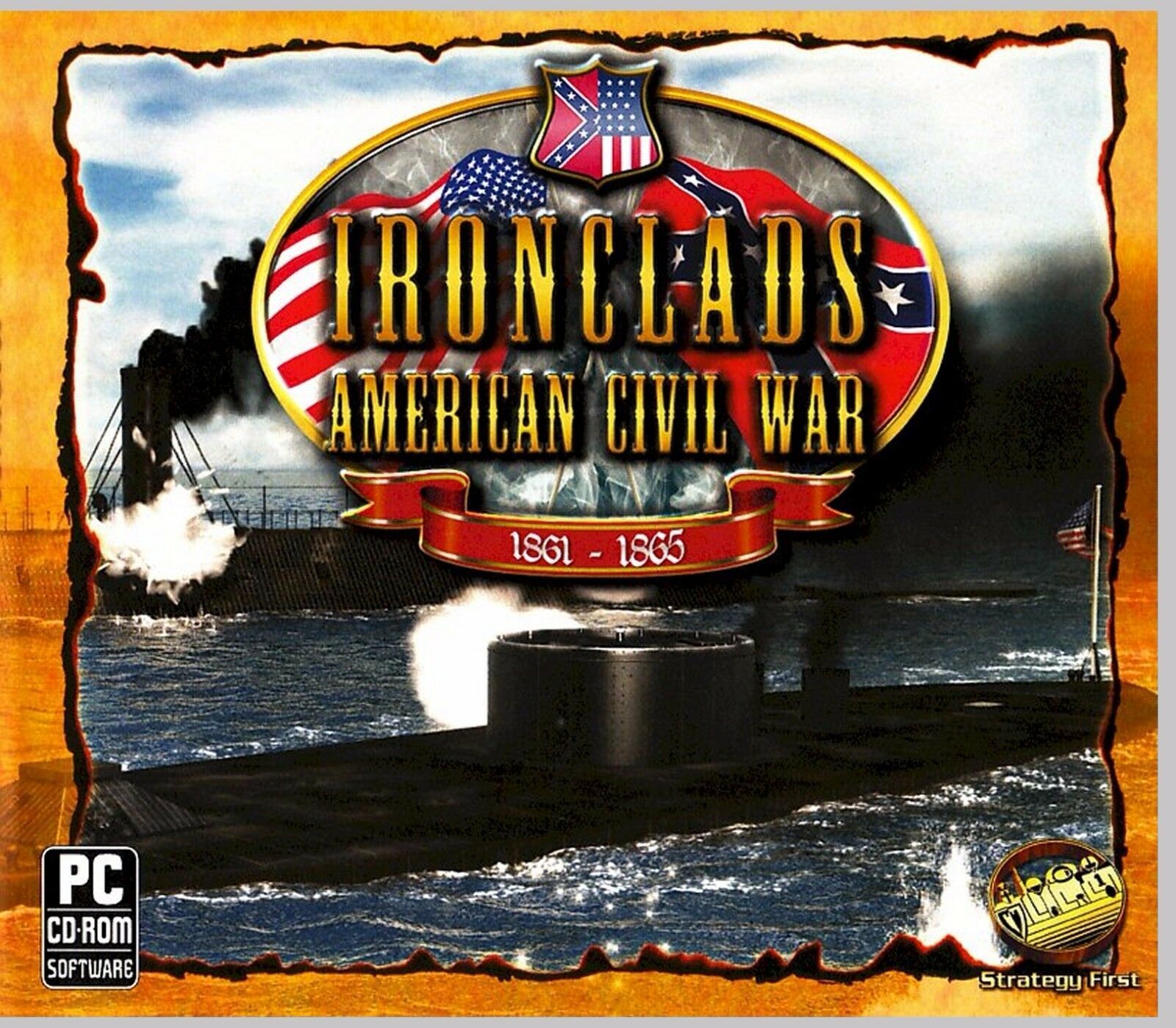
Ironclads American Civil War. 14 Missions. and 50 similar items
Free Shipping
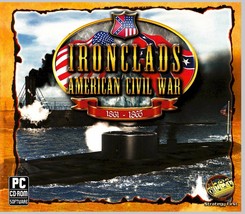
IRONCLADS AMERICAN CIVIL WAR. 14 MISSIONS. 18 HOURS OF PLAYING TIME. SHIPS FREE
$9.65
(It may be possible to pay only $8.40 instead of $9.65 when you
use your bCredits at checkout)
Sign up and get $5.00 bCredits free to use at checkout and another $5.00 bCredits when you make your first purchase. More info
Share & earn! Sign in, share this or any listing, and you’ll get commission when it sells.
Learn more

View full item details »

Shipping options
Seller handling time is 1 business day Details
FREE in United States
Offer policy
OBO - Seller accepts offers on this item.
Details
Return policy
Full refund available for DOAs
Purchase protection
Payment options
PayPal accepted
PayPal Credit accepted
Venmo accepted
PayPal, MasterCard, Visa, Discover, and American Express accepted
Maestro accepted
Amazon Pay accepted
Nuvei accepted
View full item details »
Shipping options
Seller handling time is 1 business day Details
FREE in United States
Offer policy
OBO - Seller accepts offers on this item.
Details
Return policy
Full refund available for DOAs
Purchase protection
Payment options
PayPal accepted
PayPal Credit accepted
Venmo accepted
PayPal, MasterCard, Visa, Discover, and American Express accepted
Maestro accepted
Amazon Pay accepted
Nuvei accepted
Item traits
| Category: | |
|---|---|
| Quantity Available: |
8 in stock |
| Condition: |
Brand New |
| Platform: |
PC |
| Genre: |
Strategy |
| UPC: |
0798936843982 |
| Release Year: |
2010 |
| Game Name: |
Ironclads: American Civil War [Jewel Case] |
| Country of Origin: |
United States |
Listing details
| Seller policies: | |
|---|---|
| Shipping discount: |
Seller pays shipping for this item. |
| Posted for sale: |
More than a week ago |
| Item number: |
966395573 |
Item description
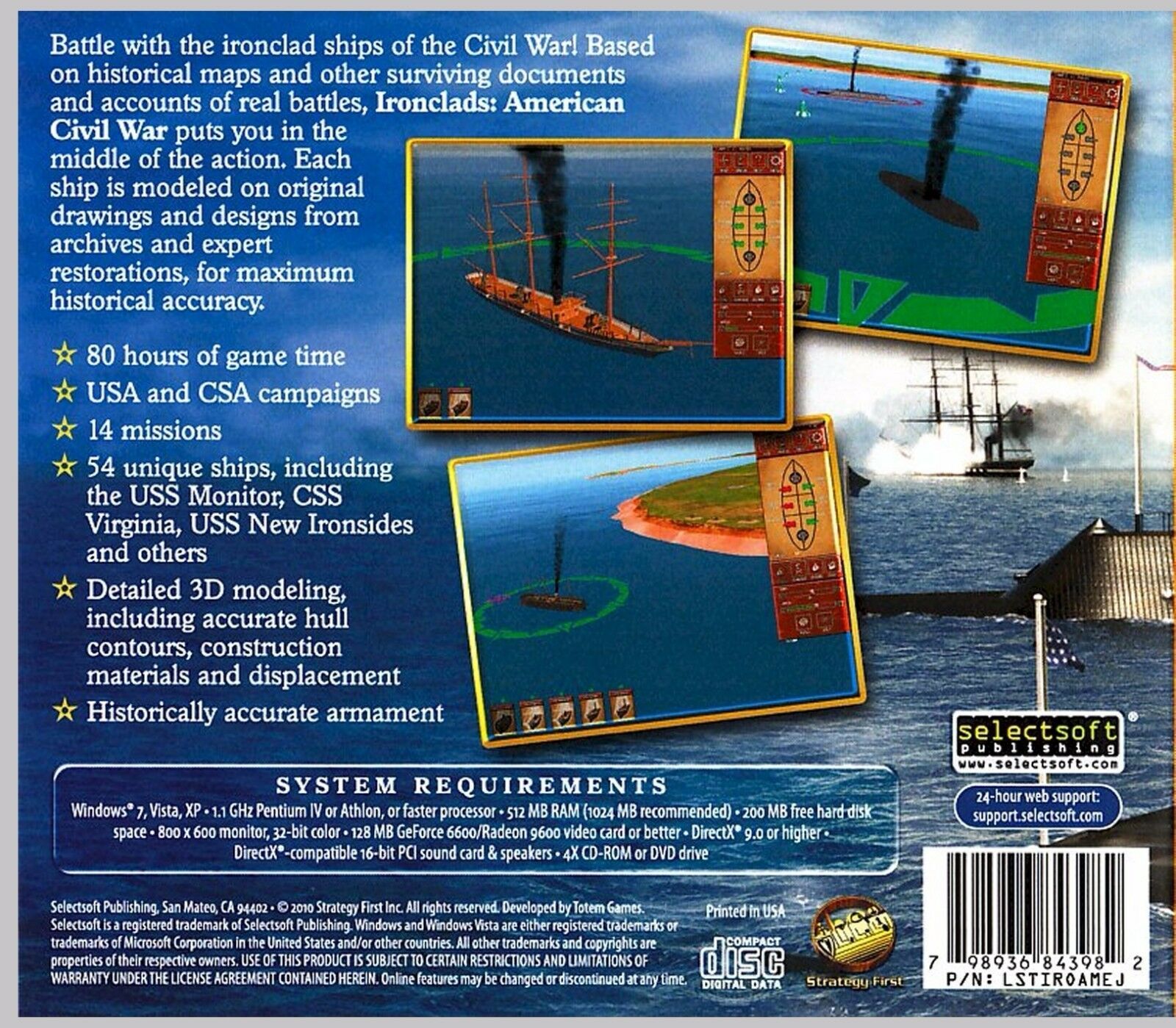
Battle with the ironclad ships of
the Civil War! Based on historical maps and other surviving documents and
accounts of real battles, Ironclads: American Civil War puts you in the middle
of the action. Each ship is modeled on original drawings and designs from
archives and expert restorations, for maximum historical accuracy.
FEATURES:
USA and CSA campaigns
14 missions
80 hours of game time
54 unique ships, including
the USS Monitor, CSS Virginia, USS New Ironsides and others
Detailed 3D modeling,
including accurate hull contours, construction materials and displacement
Historically accurate
armament
SYSTEM REQUIREMENTS
Windows 7, Vista, or XP
1.1 GHz Pentium IV or
Athlon, or faster processor
512 MB RAM ( 1 GB
Recommended)
200 MB free hard disk space
nVidia GeForce 2 or ATI
Radeon 7500 video card (nVidia GeForce 4 Ti 4200, ATI Radeon 9600 or
higher recommended)
DirectX 9.0 or higher
Sound Card, Speakers and
Mouse
4 X CD-ROM or DVD Drive
BRAND
NEW FACTORY SEALED JEWEL CASE SOFTWARE.
SHIPS FREE WITH
TRACKING WITHIN 24 HOURS.
THANKS FOR LOOKING!
THANKS FOR CHECKING
OUT OUR SALES
Ironclads:
American Civil War Game Manual v. 1.0
I. Game Description.
This
game will include elements of various genres - historical wargame, naval
simulation and turn-based tactical strategy.
The
flow of time is organized into rounds. Within the limits of each round, the
player and the computer opponent take turns executing all actions
possible within five minutes of real time combat for each of their ships. At
the moment when the selected active ship is carrying out an
action, all other game units are motionless. Time for decision-making is not
limited.
Game
locations are presented in real 1:1 scale and are not divided into cells or
hexagons. The trajectory of movement of the active ship is determined
by laws of physics and calculated using realistic speed, size and shape of a
unit.
Immersion
in the game world is created by means of two key features: historical accuracy
in the presentation of events, and realism in simulating
combat.
II. System requirements.
Before
installation, verify that your computer meets the minimal system requirements.
Close all other programs prior to installing. You must have
DirectX 9.0c installed. After installation you can start the game from the
windows ?Start? menu.
WARNING: Game
stability or performance on notebooks and laptops has not been tested.
Minimal:
Recommended:
OS:
Windows XP SP2 / Vista, DirectX 9.0C
The
processor: Pentium 4 / Athlon 1.1 GHz or better
RAM:
512 MB
Videocard:
128 MB GeForce 6600 / RADEON 9600 or better
Sound
card: compatible with DirectX 16-bit sound PCI a card
OS:
Windows XP SP2 / Vista, DirectX 9.0C
The
processor: Pentium 4 / Athlon 2,4 GHz or better
RAM:
1024 MB or above
Videocard:
256 MB GeForce 7600 / RADEON x1600 or better
Sound
card: compatible with DirectX 16-bit sound PCI a card
III. How to install.
Before
installing Ironclads: ACW on Windows 2000 or XP, please ensure that you have
administrative rights. Ironclads: ACW must be installed
in an account that has adequate permissions to perform its function. If you are
unsure if you have the requisite permissions please contact
your system administrator or refer to your computer's user guide before
proceeding.
1.
Start installation: when the download is completed, double-click on the setup
file to start the installation.
2.
Welcome Screen: press "Next" to continue to the license Agreement
Screen. Please read the license agreement before you proceed. When you
have completed reviewing the agreement and if you agree to the terms, click the
checkbox next to "I accept the license agreement" and press
"Next" to continue with the installation of the software.
3.
Destination Location: click "Next" to accept the default location or
use "Browse" to specify where you want Ironclads: ACW installed.
4.
Start Installation: click "Next" to start installing Ironclads: ACW
into your computer. After the copying of files you will get a confirmation that
the installation was successful.
5.
Installation successful. Click "Finish" to complete the installation
process.
IV. Management of the game
camera.
1.
Camera rotation: Move the mouse left or right while holding the right mouse
button. This can also be accomplished using the ?Home" and ?End?
keys on the keyboard.
2.
Camera height: move the mouse up or down while holding the right mouse button.
This can also be accomplished using the "PgUp" and ?PgDn?
keys on the keyboard.
3.
Camera zoom: scroll the mouse wheel up or down or use the ?+? and ?-? keys on
the keyboard.
V. Tactics and unit stats.
The
player is provided information about his ships such as their arms and armor,
and damage sustained during the fight. Information on enemy
ships is not available. This way you know just as much as your counterparts did
back then. You may be able to tell that you have damaged
the enemy, but you won?t truly know how badly until he runs or sinks.
All
information for naval officers of the time had the general specifications of
their ships. Data for the artillery tables and other similar documents
were only estimates and in some instances guesses as to reliability or
performance.
To
destroy an enemy ironclad, it was necessary to come as close as possible,
almost point blank range, and then to fire all available guns.
Ideally,
turning parallel to the enemy to fire a broadside was the best means of doing
this. Iron and steel shells for the rifled guns and large caliber
smooth-bore guns should punch the armor. Explosive shells could not punch
through armor, but damaged or destroyed the ship with powerful
explosions on unprotected areas.
In
addition to guns, some ships were also equipped with a large ram. Ships with
rams were able to easily destroy unarmored opponents and severely
damage ironclad ships and sometimes even sink them.
VI. Ship Management.
The
Menus for ship management are located from top to bottom as follows:
1.
The control panel 1.
Line
1: Shows the total rounds per mission and the number of rounds already played.
Line
2:to open the 2nd map to finish a round exit to help screen exit to game menu
2.
The control panel 2.
Artillery
Damage Flooding Fires
SB
- smooth-bore guns
R
- rifle guns
D
- Dahlgren guns
P
- Parrott guns
B
- Brooke guns
100%
- Destroyed
0%
- No damage
100%
- Sunk
0%
- No flooding
100%
- Destroyed
0%
- No damage
there
are no guns
nearly
destroyed sinking engulfed in flames
already
fired
heavy
damage heavy flooding ablaze
ready
to shoot
average
damage average flooding burning
aimed
at the enemy
undamaged
undamaged undamaged
trunk/calibre/type:
Rifle 6.4 in. Brooke = R6.4B
R6.4B
1/1 : number of guns available and number of guns that are operable
3.
Control panel.
3.1.
Movement of the ship:
turn
the ship to the left turn the ship to the right movement
on a straight line
3.2.
Ship speed: green
strip - speed of the ship
to
reduce speed to increase speed stop
full speed
TIP:
Your speed can only be increased or decreased without penalties when going in a
straight line.
All
movement must be completed before a round can end.
3.4.
Buttons of management:
to
begin movement
to
stop movement
The
ship?s movement path is set by a sequence of anchor buoys.
remove
from group
VII. Management of shooting.
Sequence
of actions necessary for a shot:
1.
On your ship?s diagram, determine which guns are aimed at the enemy.
2.
Place the cursor on the gun/guns and click the mouse button.
3.
The cursor should now change to a ?shell? (see picture below).
4.
Target the nearest enemy ship highlighted by a red circle.
5.
The ?shell? should turn red and note the accuracy % of a shot. Click the mouse
to fire.
After
a successful shot the gun will turn ?red? indicating it has been fired this
round. If all actions have been executed correctly there will be a
shot and you will see splashes (miss) and explosions (hit).
The
name of the
enemy ships is in red. The name of
your ships is in green.
The
base accuracy percentage of each shot is shown.
The distance from the target will increase (closer)
or decrease (farther) this percentage. the
gun is active aimed at the enemy
VIII. Navigation 2nd map.
To
open the information screen on the vessels involved, use the 2D map and click
on the circle with a star inside. To close the ship information
screen, move the cursor to the map border and press the mouse button.
The
green symbols show your ships and red the enemy ships.
TIP:
Moving outside the 2d map will exit the ship(s) from the fight. Use this tactic
to save damaged ships from destruction.
Be
aware of your ship?s position in relation to the coast. If you run your ship
aground, you can?t move it anymore and the movement control panel
will be switched-off.
|
Why are we showing these items?
Search Results
Game, video games"game" Category "Video Games"
|



-
Refine your browsing experience
We can show you more items that are exactly like the original item, or we can show you items that are similar in spirit. By default we show you a mix.

This item has been added to your cart
 IRONCLADS AMERICAN CIVIL WAR. 14 MISSIONS. 18 HOURS OF PLAYING TIME. SHIPS FREE added to cart.
8 available in stock
IRONCLADS AMERICAN CIVIL WAR. 14 MISSIONS. 18 HOURS OF PLAYING TIME. SHIPS FREE added to cart.
8 available in stock
View Cart or continue shopping.
 Please wait while we finish adding this item to your cart.


Get an item reminder
We'll email you a link to your item now and follow up with a single reminder (if you'd like one). That's it! No spam, no hassle.
Already have an account?
Log in and add this item to your wish list.


